Progressive Loading
Progressive loading is one of the core features behind react-pro-image's perceived performance. Instead of leaving users staring at a blank rectangle while a full-resolution image downloads, the component immediately renders a lightweight blurred placeholder, a tiny version of the same image that weighs just a few kilobytes.
The moment the real image finishes loading in the background, the placeholder smoothly crossfades out, revealing the sharp, full-quality version beneath it. The entire transition is invisible on fast connections and feels instant on slow ones.
This eliminates the two most common image-loading problems: blank white boxes that create a poor first impression, and layout jumps (Cumulative Layout Shift) caused by images that push content around as they pop in. With progressive loading enabled, the reserved space is always filled, the layout never shifts, and the user sees meaningful content from the very first frame.
How It Works
The progressive loading pipeline moves through three distinct stages inside a single, fixed-size container. The diagram below illustrates the full flow, from the initial mount through the crossfade transition.
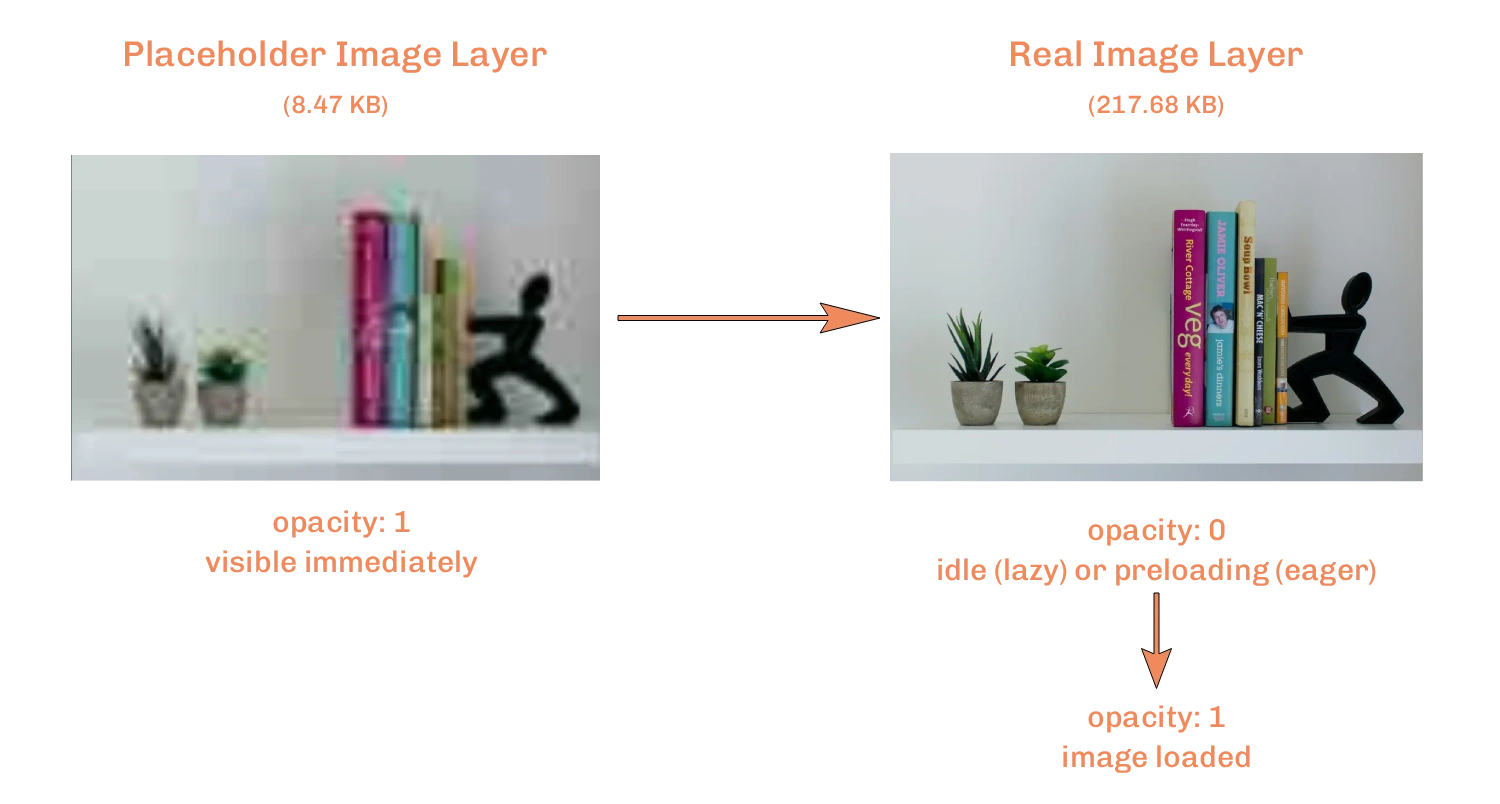
Stage 1: Placeholder renders instantly
The moment <OptimizedImage /> mounts, the placeholder URL is handed to an <img> tag at full opacity. Because placeholders are intentionally tiny (a blurry, low-resolution version of the real image), they download in milliseconds, often before the browser finishes parsing the rest of the page.
mount
  └─► placeholder layer → opacity: 1  (visible immediately)
  └─► real image layer  → idle (lazy) or preloading (eager)
Stage 2: Real image preloads off-screen
Once the container enters the viewport, useImageLoader creates a hidden Image() object in memory, not a DOM node, and starts fetching the best available format (AVIF → WebP → original). This happens silently in the background; the user sees only the placeholder.
const img = new Image();
img.onload = () => setImageState('loaded');
img.onerror = () => setImageState('error');
img.src = resolvedSrc; // best available format URL
Stage 3: Crossfade fires
The instant imageState flips to "loaded", the real image is already in the browser cache. The placeholder's opacity transitions to 0 while the real image fades in beneath it, a seamless handoff with zero layout shift.
{/* Placeholder layer: fades out on load */}
<ImageWithFormats
  src={placeholder}
  customStyles={{
    opacity: isLoaded ? 0 : 1,
    transition: 'opacity 0.3s ease',
  }}
/>

{/* Real image layer: already cached, appears instantly */}
<ImageWithFormats src={src} avifSrc={avifSrc} webpSrc={webpSrc} />
Auto-format negotiation
During Stage 2, the component doesn't just load any image. It picks the smallest possible format the browser can decode. Using the autoFormat configuration, it tests support for modern formats (AVIF first, then WebP) and appends the winning format as a query parameter to your CDN URL. This means the placeholder crossfades directly into an optimally compressed image, not just the original JPEG or PNG.
import { OptimizedImage } from 'react-pro-image';

function HeroImage() {
  return (
    <OptimizedImage
      autoSrc="https://images.unsplash.com/photo-1469474968028-56623f02e42e?w=1200"
      autoFormat={{ formatKey: 'fm', formats: ['avif', 'webp'] }}
      autoPlaceholder="https://images.unsplash.com/photo-1469474968028-56623f02e42e?w=20&blur=10"
      alt="Sunlit mountain valley"
      width={1200}
      height={600}
    />
  );
}
In this example, a browser that supports AVIF will request ...&fm=avif, receiving a file that is typically 50–80% smaller than the equivalent JPEG. A browser without AVIF but with WebP support falls back to ...&fm=webp. And if neither is available, the original URL is used unmodified. Format detection runs once per browser and is cached in localStorage, so the cost is paid exactly once.
The autoPlaceholder URL above is the same image at w=20, just 20 pixels wide. At that size the file weighs only a few kilobytes and arrives before the full image even begins downloading.
Layer Architecture
Both the placeholder and the real image live inside a single position: relative container. They are stacked using position: absolute; inset: 0 and object-fit: cover, so they occupy exactly the same space at all times. Swapping between them is a CSS change, not a layout recalculation.
┌──────────────────────────────────────┐
│  wrapper  (position: relative)       │
│                                      │
│  ┌────────────────────────────────┐  │
│  │  real image  (absolute)        │  │  ← opacity: 1 → 0 on load
│  └────────────────────────────────┘  │
│  ┌────────────────────────────────┐  │
│  │  placeholder (absolute)        │  │  ← always opacity: 1
│  └────────────────────────────────┘  │
└──────────────────────────────────────┘
The placeholder sits on top (last in DOM order) at opacity: 1, masking the real image beneath it. When the real image finishes loading and the placeholder transitions to opacity: 0, the sharp image becomes visible, giving the illusion of a seamless crossfade with no component re-mount, no DOM swap, and no layout shift.
Interaction with Lazy Loading
Progressive loading and lazy loading are independent features that compose naturally. When both are enabled (the default), the placeholder appears immediately while the real image waits until the container scrolls into view before it starts downloading. This gives you the best of both worlds: instant visual feedback and zero wasted bandwidth for off-screen images.
lazy | placeholder | Result |
|---|---|---|
true (default) | provided | Placeholder appears immediately. The real image starts downloading only when the container enters the viewport. The crossfade happens after the user scrolls. |
true | omitted | Container stays blank until the element enters the viewport, then the image appears. |
false | provided | Both the placeholder and the real image start loading on mount. The crossfade fires as soon as the real image is ready. Best for above-the-fold hero images. |
false | omitted | Image loads and appears immediately on mount with no transition. |
For hero images or banners that are visible without scrolling, combine lazy={false} with a placeholder. The blurry preview appears in under 100 ms while the full-quality image loads behind it, the fastest possible perceived load time.